Fleet and component register
Every vehicle, every component and every meter reading, with a history that follows a component into its next vehicle.

Home / OptiFleet
OptiFleet by DigiNergy
OptiFleet holds the register of vehicles and components, the maintenance plans, the requests and findings, the workshop schedule, the job cards and the parts. Reports and audit evidence come from the same records.
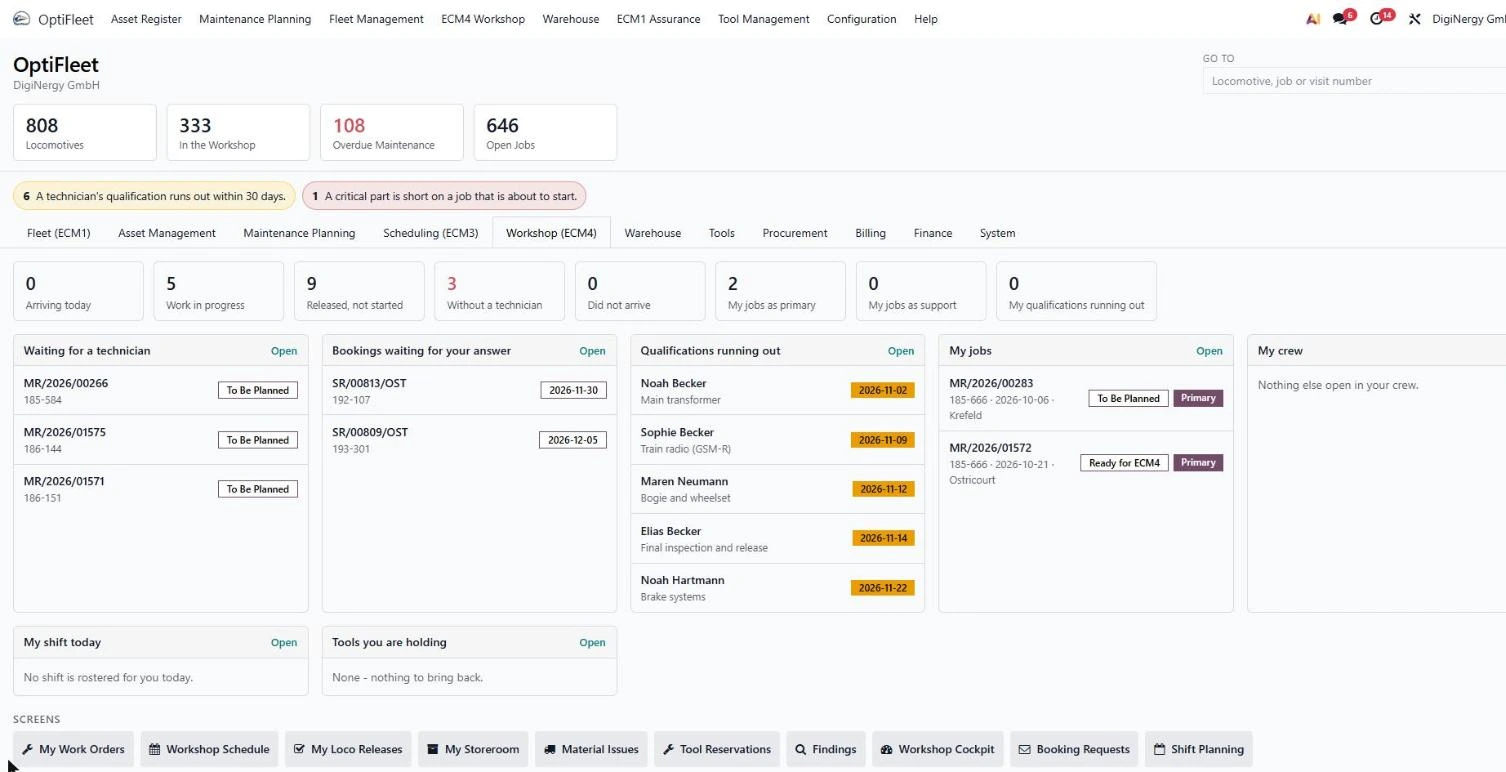
What OptiFleet covers
Most maintenance tools cover one step of this chain and leave the rest to spreadsheets. The handovers between them are where dates slip and findings get lost. OptiFleet keeps the whole chain in one record, so the figures in the reports come from the work itself.
Every vehicle, every component and every meter reading, with a history that follows a component into its next vehicle.
Your maintenance rules become dated plans per vehicle type and per vehicle, versioned and with a validity date.
A driver, a workshop, a customer or an inspection reports once. The report lands in one queue with a severity and an owner.
Due dates from kilometres, operating hours and calendar together, with a forecast of the next twelve months of work.
Jobs onto workshops, tracks, positions and shifts, with capacity, qualification and any clash visible as you place them.
The job card the technician works from, in their language, with steps, measurements, photos and sign-off.
What the plans will consume, what is reserved for which job, what is short, and what the job used.
Release of the vehicle, the cost of the job, the figures for the month and the evidence pack for an audit.
Where it goes wrong
Fleet, plan, job and part are usually kept in different files and different tools, and somebody reconciles them by hand.
One list for the vehicles, another for the components, a third in the workshop’s own files. Nobody is certain which one is right, so every question starts with a reconciliation.
The real plan is a workbook on one person’s machine. It works, until that person is on holiday, until a rule changes, or until someone asks what the plan looked like eighteen months ago.
Job records in one system, measurements on paper, signatures in a folder, parts in the ERP. Producing one coherent history for one vehicle takes days of somebody’s week.
Who uses it
OptiFleet is not only used by the maintenance department. These are the people who work in it, and what each of them opens it for.
What is due this month, what is overdue, how many vehicles are available, and which plan version is in force for each type.
One list of what is due and overdue, and an answer ready when somebody asks why a vehicle is standing.
Owns the rules. Writes the intervals and the task content per vehicle type and publishes a new plan version with a validity date.
Sees the twelve-month forecast of the work a plan will generate, and where repeat findings on a component say the interval is wrong.
Deviations and repeat findings on safety-relevant components, each with the recorded reason, two-person release, and the evidence pack per vehicle.
When a manufacturer notice arrives: which of your vehicles carry the affected component.
Which vehicles are available in the coming days, when the one in the workshop comes back, and what falls due next that will take a vehicle out of service.
Put a job on a workshop, a track and a shift and see any clash as you place it.
Move one job and everything downstream moves with it.
Today’s board: which vehicle is on which track, who is working on it, what is finished, and what is waiting on a part or a decision.
Capacity for next week before you promise it.
The job on a tablet in the workshop, in their own language, with the steps, the measurements to record, the photo to attach and the sign-off.
What the maintenance plans will consume over the coming months, what is reserved for which job, what is short, and which vehicles are waiting for a part.
The twelve-month demand from the plans, with long lead-time items such as wheelsets and exchange units visible early. Supplier and warranty reference per component, so a claim goes out with the component’s history attached.
Cost per vehicle, job and component from booked hours and parts, separated by owner, keeper and contract. The forecast feeds the maintenance budget.
The qualification matrix per technician with expiry dates, so a certificate running out in the coming weeks is visible before a job is placed with that person. Access to personal data is restricted by role.
A keeper sees their own vehicles, jobs and documents in a portal holding only their data. A contractor sees the jobs assigned to them, records the result and attaches the documents.
Capabilities
Six blocks, one for each part of the chain. Most operators run each of them in a separate tool today.
Vehicles, wagons, components and meters, with their full history.
Everything reported about a vehicle, in one queue.
The rules per vehicle type, and the work they make due.
Work placed into workshops, tracks and shifts.
What the technician works from, and what it records.
Demand, reservation, stock and consumption per job.
The business case
We do not publish improvement percentages we have not earned on a customer fleet. What we can do is name the levers this system exists to move, agree the baseline with you before anything starts, and review them with you afterwards.
Fewer vehicles standing for avoidable reasons, such as a missing part or a double-booked track.
Findings are recorded and triaged early, so fewer of them grow into failures.
The number of overdue tasks is visible every day, per vehicle and per type.
Less idle capacity and fewer overloaded weeks, because jobs are placed against actual capacity.
Hours and parts are booked on the job, so the basis for the invoice exists when the work ends.
The full history of a vehicle, including the plan in force at the time, comes from the system.
Comparison
A general maintenance tool, the maintenance module of the ERP you already own, a set of spreadsheets, or building it yourself. All four are real options and all four work for somebody. The rows below are the rail-specific ones, which is where the difference shows up.
| Rail-specific requirement | OptiFleet | General CMMS | ERP maintenance module | Spreadsheets |
|---|---|---|---|---|
| Component history that follows a part between vehicles | Yes | Sometimes | Rarely | No |
| Due dates from kilometres, hours and calendar together | Yes | Partly | Partly | By hand |
| Plan versions with a validity date you can prove | Yes | Rarely | Rarely | No |
| Scheduling by workshop, track and position | Yes | No | No | By hand |
| Qualification and certificate expiry checked on the board | Yes | Rarely | Partly | No |
| A portal per keeper and per contractor | Yes | Sometimes | Sometimes | No |
| Work instructions in the technician’s own language | Yes | Interface only | Interface only | No |
| Materials demand derived from the maintenance plan | Yes | Partly | Yes | No |
| Evidence produced from the system, not assembled | Yes | Partly | Partly | No |
| General ledger, payroll and company-wide purchasing | Yes, or via interface | Via interface | Yes | No |
For IT and management
Questions that usually come up once the operational side is convinced. You can forward this section to IT, purchasing or management.
Single tenant, hosted in Germany, no shared database with other customers. GDPR terms and a data processing agreement are part of the contract.
Not a must, and not a condition either. OptiFleet runs the maintenance chain. The same system also covers general ledger, payroll and company-wide purchasing, so you have a choice: keep your ERP and connect it by API or file, or move those functions here in a later phase.
DigiNergy, from Kassel. A named team with agreed response times, in German and English.
Full export of the register, the plans, the job history and the documents, in open formats, at any time.
A licence scaled to fleet size and users, a one-off implementation, and hosting. We quote after the first workshop, against your fleet and your scope.
Phased, and each phase is useful on its own. If phase one does not convince you, you stop there after a few weeks.
Implementation
Something of yours is running within weeks. Sequence and duration are agreed with you, and this is the usual shape.
Your vehicles, components and meters loaded from whatever you have today. The first thing you get is one list everybody agrees with.
Your maintenance rules configured as versioned plans. From here on you can see on one screen what is due and what is overdue.
Findings into one queue, work onto the board. This is the phase the workshop and the planner feel immediately.
Job cards in the workshop, parts booked against the job, costs and reporting closing the chain.
Product tour
Rules per vehicle type, deviations per vehicle, and a version history that tells you which plan was in force on a given date.
The fleet in one view, by workshop, track and position. Capacity and qualification are checked when you place the job.
The execution tab of the work order. This is where the technician records what was done: each step, the time spent, the parts used and the result, in their own language.
Demand that comes out of the maintenance plans, reservations tied to a specific job, and stock per workshop with reorder points.
Measured values per wheelset against their tolerances, with the correction log beside them: what was changed, why, and by whom.
ECM and audit
Register, plan, job and part sit in one place, so the evidence for an audit comes out of normal work. Certification stays with your organisation. The records behind it come from OptiFleet.
Rules, responsibilities and plan changes recorded with who decided what, and when.
Maintenance plans as versioned documents with validity dates.
Due dates, component history and release of the vehicle, per vehicle and per component.
The job as executed: steps, measurements, parts, hours and the person who signed it off.
Three questions an audit opens with, and where the answer comes from.
Question one
Open the vehicle, open the plan’s version history, read the version carrying that validity date.
Question two
The job, its steps, the measured values against their tolerances, the photographs, the parts used, the hours booked and the person who released the vehicle.
Question three
With the component, because it moved with it. The vehicle it sat in before is one line in that history.
Capability index
Book a Demo
Forty-five minutes in the real product, not slides. Send us one maintenance plan and a handful of vehicles in advance and we will set it up with your data, so you can ask the awkward questions about your own fleet.
Ludwig-Erhard-Straße 12
D-34131 Kassel, Germany
+49 561 2207 5500
info@diginergy.ai